

Answering the same status questions?
Share one status link your client can check between emails. Keep progress and next steps visible.
For small service businesses
Give clients a secure link to check their progress. Keep your client files organised and automate payment reminders when you upgrade.
Bondi Harbour Co.Monthly bookkeeping
We have received your records and started this month’s work.
Your records have been received.
We’ll let you know when your work is ready for review.
Internal notesTeam activityOther client files
One calm workflow for the moments clients care about most
The hidden cost of “just one quick update”
A clear status, a visible next step, and consistent reminders make each client easier to keep informed.
Share one status link your client can check between emails. Keep progress and next steps visible.
See files by stage, so you know what needs your attention and what is waiting on a client.
Paid plans automate milestone payment reminders, so follow-up stays connected to the work.
One action, a clearer client experience
Add a client file, update its progress, and share a link your client can check.
Build the workflow around the way your service is actually delivered. Your team sees what's active, blocked, and ready to move.
Explore status tracking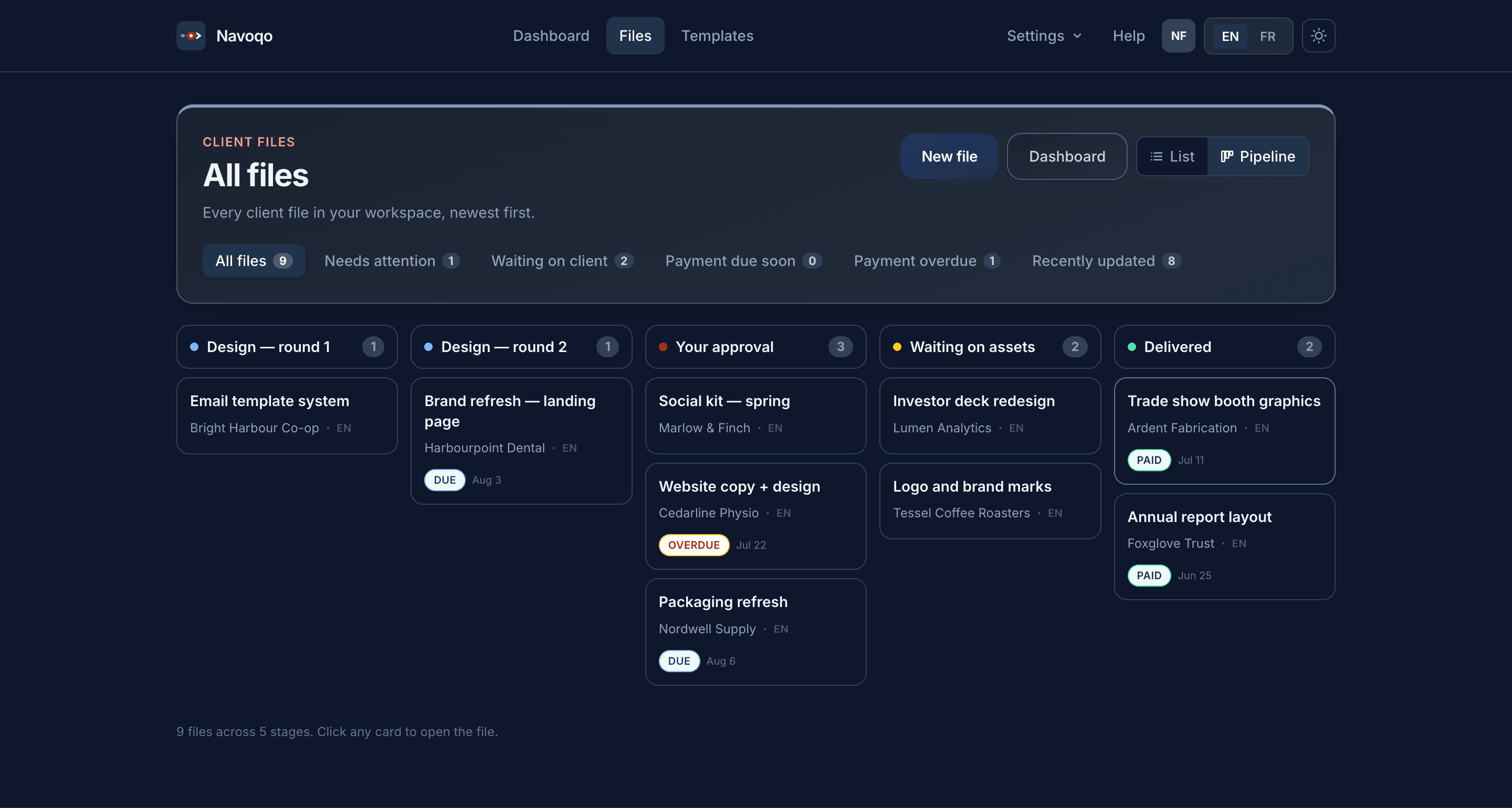
One operational view for every active client file.
Your stagesColumns you name yourself — Discovery, Design, Sign-off, whatever matches the way your business runs.
One card per clientEach file shows the client, what's due, and whether payment's on track — no clicking in required.
Quick filtersJump straight to what needs attention, what's waiting on a client, or what's overdue.
When a milestone changes, send a concise update straight from the file. The client's private page stays current without another account or password.
Explore client updates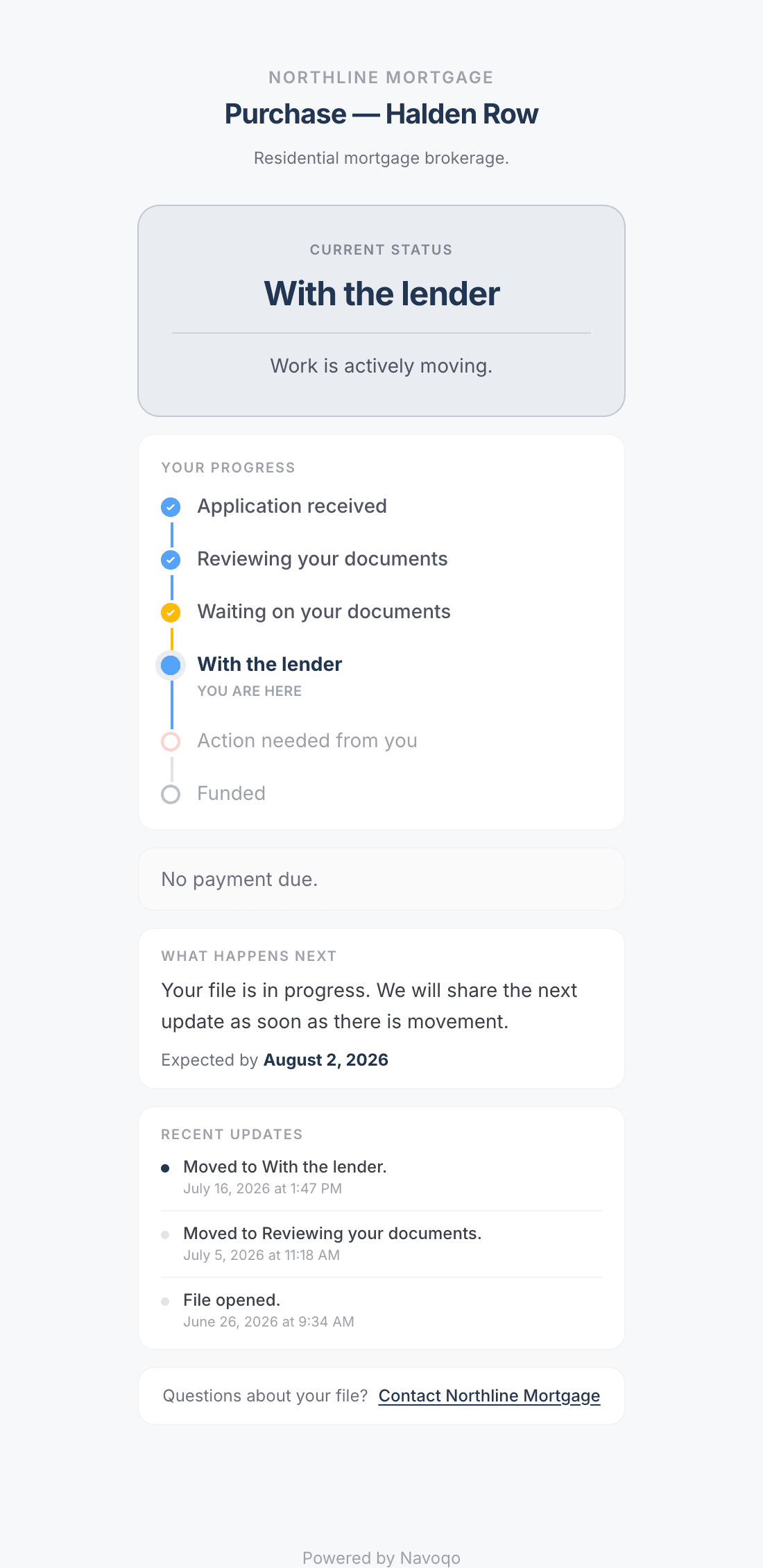
The client experience
Your client can see where things stand and what comes next.
Current statusThe first answer clients need: exactly where their file stands today.
Full progress timelineCompleted, current, waiting, and future stages stay visible in one sequence.
Payment informationThe page clearly says whether a payment is due — without exposing internal billing data.
What happens nextA plain-language expectation and date cut down on the “any update?” emails.
Recent updatesA dated history shows the file is moving and gives clients confidence.
Direct contactThe client can still reach the business when they genuinely need a hand.
Internal notesTeam activityOther client filesWorkspace settings
Starter and Pro add automated milestone payment reminders to the client work you already track.
Explore payment reminders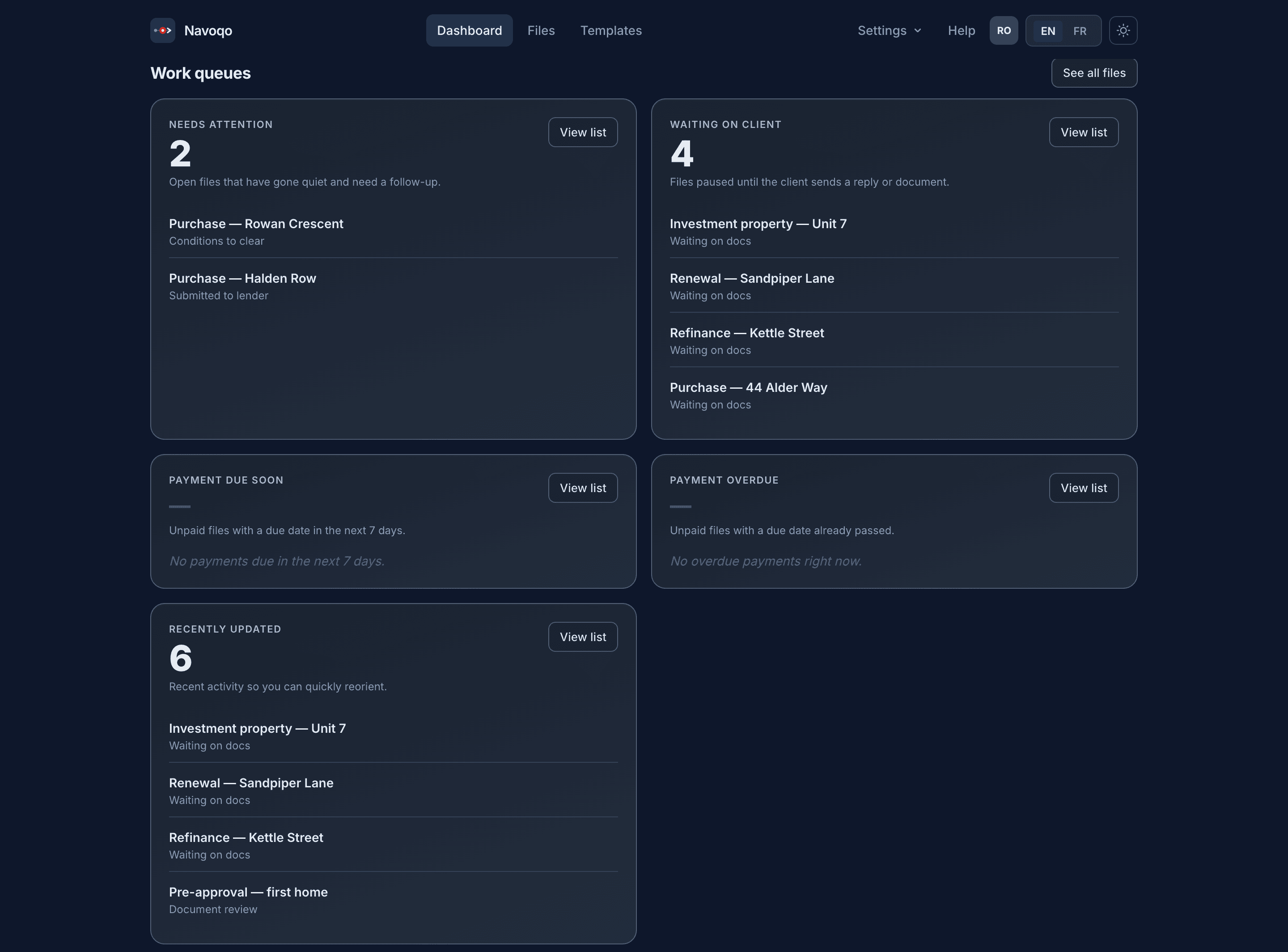
Payment follow-up stays visible without replacing your accounting tool.
Needs attentionFiles that have gone quiet and need a nudge, surfaced automatically.
Payment due & overdueUnpaid work gets called out before it turns into an awkward conversation.
Recently updatedA quick way to see what's moved since you last checked in.
A lighter way to operate
Navoqo is a focused client-communication layer — not an all-in-one CRM you spend weeks configuring.
Built for visible, stage-based client work
Websites, campaigns, video, branding, and app projects with reviews and milestone payments.
See the agency workflow Document-heavy workAccounting, immigration, legal, and compliance matters with long waits and important next steps.
See the professional workflow Made-to-order workRenovations, fabrication, restoration, and custom work where progress needs to be seen.
See the builder workflowStraightforward from day one
Keep clients informed on Free. Choose Starter for automated payment follow-up, or Pro when you need more capacity and team access.
No time limit
Keep your first clients informed.
Recommended for solo businesses
Automate payment follow-up.
A$20.30/month · 30% off for as long as you stay subscribed · Ends March 31 at 11:59 p.m. Eastern. Automatically applied.
For teams
Coordinate your growing team.
A$55.30/month · 30% off for as long as you stay subscribed · Ends March 31 at 11:59 p.m. Eastern. Automatically applied.
No credit card · No time limit · AUD · Compare plans →
No. Clients open a secure link to check their progress without a password or an app to download.
The Free plan includes status update emails, secure client links, and a limited number of active files with no time limit. Upgrade to a paid plan for automated payment reminders and more capacity.
No. Keep your existing tools for accounting and invoices. Navoqo helps you track client progress, share updates, and follow up on payments alongside them.
Archive completed files or choose a plan with more capacity. Archived files do not count toward your active client file limit.
Your next client can have a clearer experience
Add a client file, choose your stages, and share your first status link.
Start free Free plan · No credit card · No time limit