
Client update emails
Keep clients updated without writing another status email.
Change the step, add a line if you want, tick “email this update”. Your client gets a short email that says what changed and links to their page.
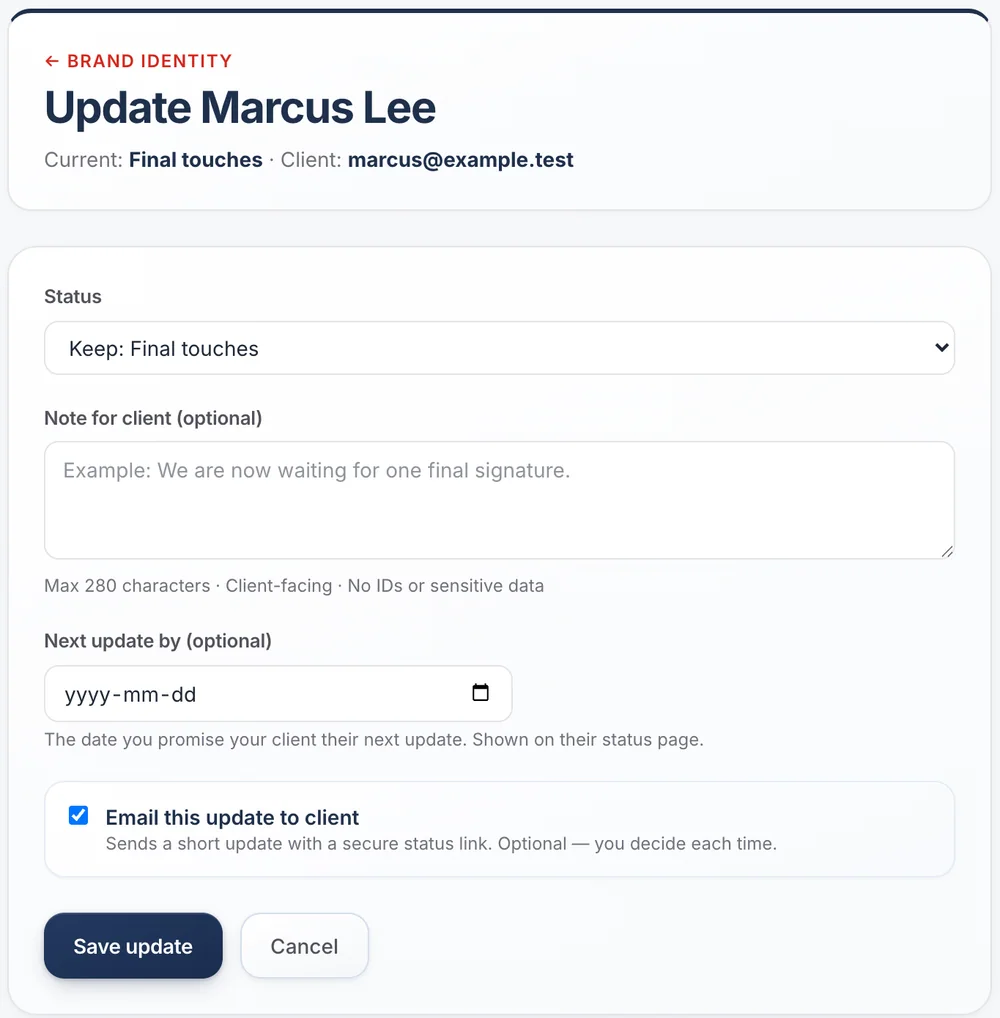
One update, three things at once.
Every update moves the client’s page forward, records what you told them and, if you tick the box, emails them. You never type the same news twice.
- Keep the step and still send news, like “still waiting on the government”
- Promise your next update date; it shows on their page
- If a date slips, send a new one in two clicks
Emails that sound like you, from you
Replies come to you
Client replies go to your own email address, not to a no-reply box.
In your name
The email shows your business name as the sender, so clients know who it is from.
Short on purpose
What changed, what happens next, one link. Nothing a client has to decode.
In their language
Each client gets emails in English or French, set per client.
Questions about update emails
Do I have to email every update?
No. Emailing is a checkbox each time. Without it, the page updates quietly.
Can I write my own message?
Yes. Add a short note to any update. It appears in the email and on the client’s page.
What if a client replies to the email?
The reply lands in your own inbox, like any email.
Do clients get spammed if I update often?
Only when you tick the box. Each update is one short email, and you can always update the page without sending one.
Guides and templates
- Client status update email examples →Ten client status update emails for real situations: progress, no progress, waiting on the client, bad news and handover — with the structure behind each.
- Template: the client status update message →One status update template for any service business: the four fields it is built from, plus variations for progress, no progress, blocked and delivered.
- How to tell a client their work is delayed, with email templates →Four ready-to-send delay emails: waiting on someone else, waiting on the client, your own mistake, and a new date you do not know yet. Plus what to leave out.
Give your clients the service you want to give.
Add a client, send one update, and watch the “where are we?” emails slow down. It takes an afternoon.
Free for 10 active projects · No credit card · No time limit